
eyeExtend for Tenable® VM
Uncover device vulnerabilities in real time and mitigate your risk exposure
- Developer
- Forescout
Enhance the power of Tenable products by extending it to every single network endpoint, whether managed, unmanaged or transient
Forescout eyeExtend for Tenable lets you harness complete device visibility and
automate response workflows for device compliance, remediation and risk mitigation
Features and Benefits
Assess device vulnerabilities on-connect
Gain real-time insight into risks and vulnerabilities on your network. eyeExtend for Tenable prevents exploitation of unmanaged
or transient endpoints by detecting devices immediately on connect. After determining if the device is new, unmanaged or has
an outdated scan, eyeExtend initiates real-time scans from Tenable, eliminating the problem of missing or out-of-date scans on
devices.Apply policy-based conditional scans
Manage device vulnerabilities after devices connect. Operators can create a Forescout platform policy that initiates a Tenable scan
automatically in the event of a device configuration change or noncompliance. For example, Forescout platform policies can be
used to trigger a scan on devices that have not been scanned in X number of days or if a device’s vulnerability severity is greater
than X or if any monitored item has changed since the last scan. Forescout platform can also use this information to initiate
remediation in these instances.Automate response and risk mitigation
Limit network access or quarantine high-risk devices identified by Tenable and initiate remediation actions automatically to fix
vulnerabilities. When Tenable identifies a device as noncompliant, it shares the information with Forescout eyeExtend. Forescout
platform quarantines or blocks the device from accessing the network dynamically and initiates remediation workflows until
the device is deemed compliant and healthy. Forescout platform can also target remediation actions such as installing required
security software, updating agents or applying security patches proactively. Once all vulnerabilities are addressed, the device is
allowed back onto the network.

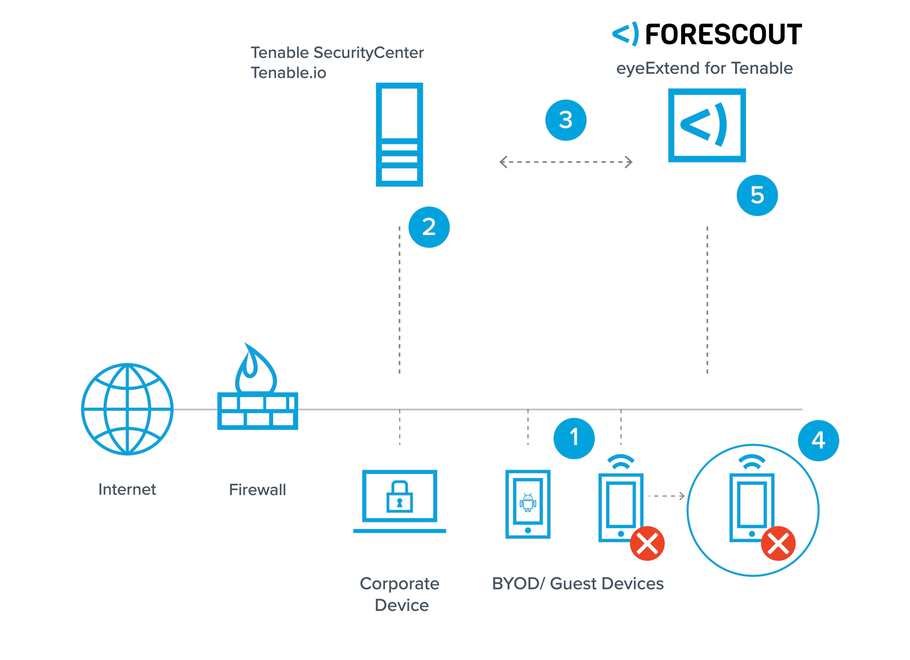
Get Complete Visibility
Get complete visibility into
corporate, personal, guest and
transient devices across IT,
cloud and OT networks
Assess Device Configuration
Assess device configuration and
compliance when and after it
connects to the network
Initiate Scans
Initiate scans based on
time of last scan, severity of
vulnerability, change in device
posture and Tenable-specific
metrics
Isolate Vulnerable Devices
Isolate vulnerable devices and
remediate vulnerabilities before
being allowed back onto the
network.
Control Access to Network
Control network access through
quarantining or blocking
vulnerable devices dynamicallyWorks with Forescout Cloud
Vulnerabilities discovered by this eyeExtend integration can be sent to Forescout Cloud’s Risk & Exposure Management (REM) solution to support vulnerability management workflows and enhance REM’s multi-factor risk scoring.
Additional Information
Support
EyeExtend modules are fully supported by Forescout. Please see support details at https://www.forescout.com/resources/activecare-maintenance-and-support-policy/
- Phone: +1-866-377-8773
- Knowledge Base
- Read Documentation
Categories
-
App Type
-
Built By
-
Licensing Category
-
Works With
Resources
Forescout eyeExtend for Tenable® Data Sheet
Download PDF